    ClipForge AI
    PricingSolutionsCompareBlogGuideFAQ
    Sign inExplore DemoGet Started Free
    Home/User Guide/Templates
    ClipForge AI / User GuideSheet 09 of 14 / Templates

    Templates

    A template sets a clip's shape, captions, hook and cards in one choice. Browse the ones that ship, or build your own.

    CF-1TemplatesStation 09 of 14Tasks3 tasksSteps6 stepsNot built0 tasks not built yet

    Tasks

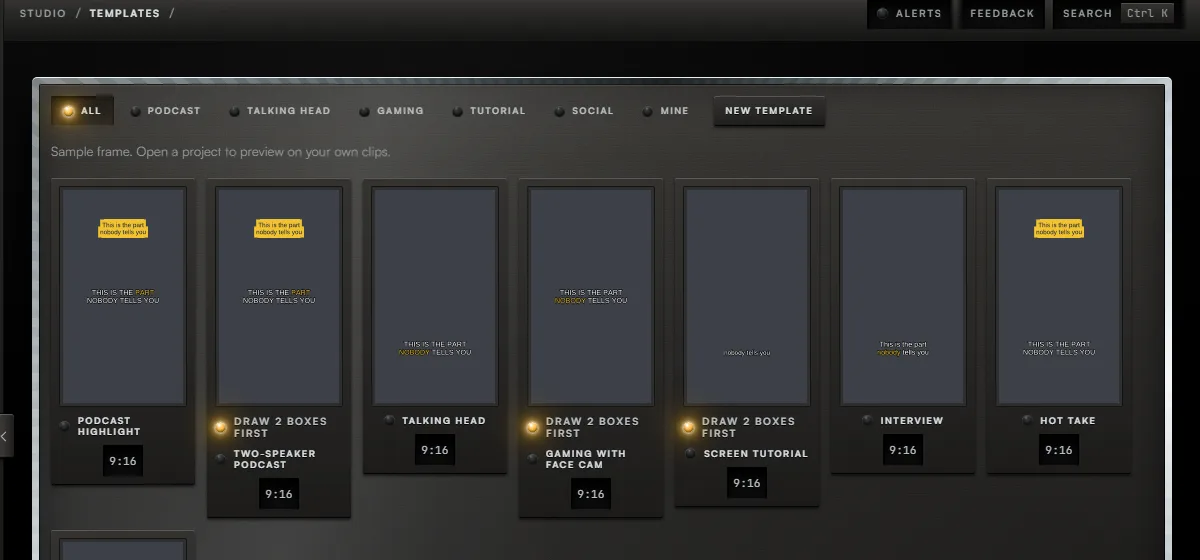
    The Templates screen, with the controls for steps 1 to 2 boxed and numbered.12

    Task 01 / Templates

    Browse the templates

    Procedure / 3 steps

    1. 01Callout 1. Press a category to narrow the list. Mine shows the ones you built.
    2. 02Press a template to open it. Its settings and a preview appear below.
    3. 03With a project open, choose a clip in Preview on to see the template on your own footage.
    Sign up to try it

    Task 02 / Templates

    Use a template on a project

    Procedure / 1 step

    1. 01Open a template and press Use on this project. It opens the project with that template chosen.
    Sign up to try it

    Task 03 / Templates Pro

    Build your own

    Procedure / 2 steps

    1. 01Callout 2. Press New template to start from blank, or open one that ships and press Duplicate.
    2. 02Change any setting. Your changes save by themselves.
    Sign up to try it
    01 of 03
    08 BatchStation10 Brand kitUser Guide

    Fig. 9 / Templates console

    Strategia-X network

    LinkedNewThis unitUnits11products in the network
    Strategia-XOperations HQ / strategia-x.comParent, opens in a new tab
    • Team-XNewAI Native Workforce OSteam-x.app, opens in a new tab
    • Strategia-X AIApp Idea Validatorstrategia-x.ai, opens in a new tab
    • Android ArchitectAI App Engineeringandroid-x.com, opens in a new tab
    • Vision Studio XNewLocal AI Generationvision-studio-x.com, opens in a new tab
    • Lumina StudioCreative Subscriptionlumina-os.com, opens in a new tab
    • ClipForgeThis unitAI Video Clippingclip-forge.io
    • ElementForgeWindows Creative Suiteelement-forge.app, opens in a new tab
    • ResumeForgeCareer Intelligenceresume-forge.app, opens in a new tab
    • STX.1System Monitorstx-1.com, opens in a new tab
    • Dynasty-XAndroid Appsdynasty-x.com, opens in a new tab
    • WealthWise OSAI Personal Financewealthwiseos.com, opens in a new tab
    • All productsFull catalogstrategia-x.com, opens in a new tab
    ClipForge AI

    Gold-standard creative infrastructure.

    Solutions

    For PodcastersFor YouTubersFor AgenciesFor TikTok CreatorsFor Content TeamsFor Educators

    Resources

    PricingCompareBlogUser GuideFAQLive DemoAccess Portal

    Legal

    TermsPrivacyContact

    About the Developer

    ClipForge AI is built by Strategia-X, an elite IT and business operations consulting firm specializing in strategic technology implementation and digital transformation. Founded by Rocky Elsalaymeh, Strategia-X delivers innovative software products and consulting services with a direct partnership approach.

    Strategia-X

    2026 ClipForge AI. All rights reserved.