
ClipForge AI / User GuideSheet 12 of 14 / Automations
Automations
AgencyRules that act on a clip when it is found, and webhook endpoints that receive signed events when your work finishes.
AutomationsStation 12 of 145 tasks12 steps1 task not built yet
Tasks
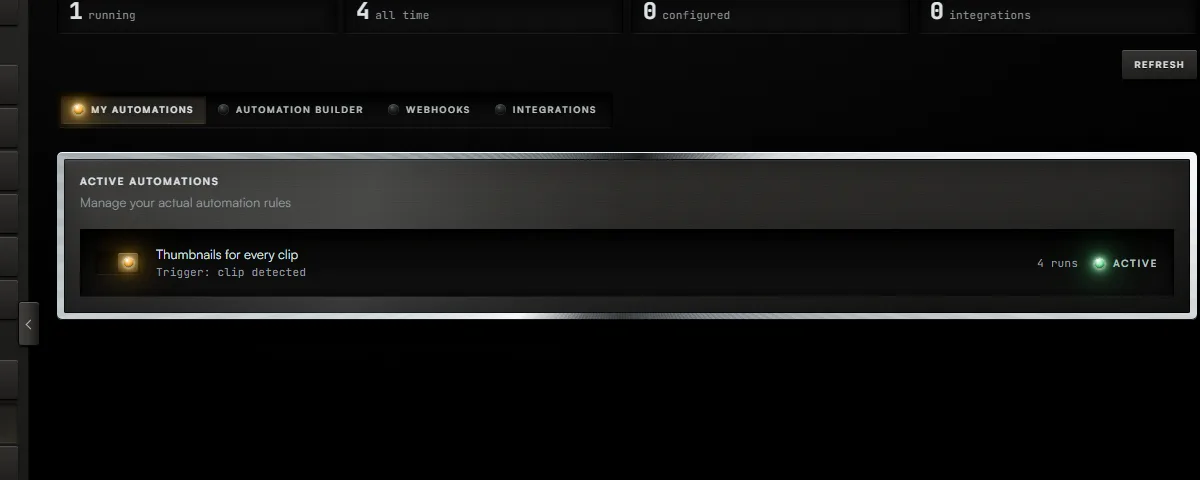
Task 01 / Automations
Turn a rule on or off
Procedure / 2 steps
- Callout 1. My Automations lists your rules. Use a rule's switch to turn it on or off.
- A rule that is on and starts on Clip Detected runs once for each clip that clip detection finds in a project, best score first. One detection starts at most 30 runs. Clips found by a batch do not start rules.
Task 02 / Automations
Create a rule
Procedure / 4 steps
- Callout 2. Press Automation Builder.
- Press Create Automation Rule.
- Name the rule, choose what starts it, press each action it should take, and press Create Rule.
- On a rule, Run starts it by hand on the clip you choose, and Test shows what it would do without doing it.
Task 03 / Automations
Add a webhook endpoint
Procedure / 2 steps
- In Automation Builder press Webhooks, then Create Webhook. Give it a name and the address to call. The events you pick are saved with it.
- Press Test on a webhook to send it one request now and see the answer.
Task 04 / Automations
Receive an event when something happens
Procedure / 4 steps
- Each event you picked is sent to the address when it happens: a project created, finished or failed, clips detected, an export finished, a batch started, finished or failed, a translation or a dub finished.
- Press Show secret on the webhook to read its secret. Each request carries X-ClipForge-Signature: sha256= and the HMAC-SHA256 of its body, keyed with that secret, so the address can check that ClipForge sent it.
- An event that does not get a 2xx answer is sent again up to three more times, a minute after the first try and then twice as long each time.
- New secret replaces the secret. The old one stops verifying at once.
Task 05 / Automations
Connect an app in one press
Status
Not built yetConnecting apps from here is not built. Zapier and Make work through a rule: add a Send to Zapier or Send to Make action and paste the hook address there.
01 of 05
Fig. 12 / Automations console