    ClipForge AI
    PricingSolutionsCompareBlogGuideFAQ
    Sign inExplore DemoGet Started Free
    Home/User Guide/Projects
    ClipForge AI / User GuideSheet 02 of 14 / Projects

    Projects

    Every project on your account, newest first. Find one, open it, or delete it.

    CF-1ProjectsStation 02 of 14Tasks4 tasksSteps6 stepsNot built0 tasks not built yet

    Tasks

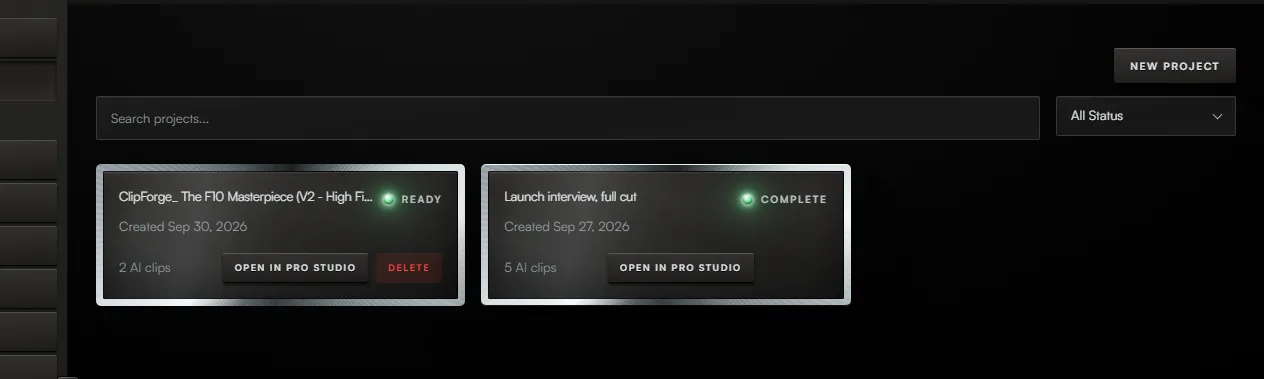
    The Projects screen, with the controls for steps 1 to 4 boxed and numbered.1234

    Task 01 / Projects

    Find a project

    Procedure / 2 steps

    1. 01Callout 1. Type part of a name in the search box. The list narrows as you type.
    2. 02Callout 2. Choose a status in the filter to see only projects in that state.
    Sign up to try it

    Task 02 / Projects

    Open a project

    Procedure / 2 steps

    1. 01Press anywhere on a project to open its page.
    2. 02Callout 3. Press Open in Pro Studio to open it in the timeline editor instead.
    Sign up to try it

    Task 03 / Projects

    Delete a project

    Procedure / 1 step

    1. 01Callout 4. Point at a project, or move to it with Tab, and press Delete. The browser asks you to confirm.
    Sign up to try it

    Task 04 / Projects

    Start a project

    Procedure / 1 step

    1. 01Press New Project.
    Sign up to try it
    01 of 04
    01 HomeStation03 New projectUser Guide

    Fig. 2 / Projects console

    Strategia-X network

    LinkedNewThis unitUnits11products in the network
    Strategia-XOperations HQ / strategia-x.comParent, opens in a new tab
    • Team-XNewAI Native Workforce OSteam-x.app, opens in a new tab
    • Strategia-X AIApp Idea Validatorstrategia-x.ai, opens in a new tab
    • Android ArchitectAI App Engineeringandroid-x.com, opens in a new tab
    • Vision Studio XNewLocal AI Generationvision-studio-x.com, opens in a new tab
    • Lumina StudioCreative Subscriptionlumina-os.com, opens in a new tab
    • ClipForgeThis unitAI Video Clippingclip-forge.io
    • ElementForgeWindows Creative Suiteelement-forge.app, opens in a new tab
    • ResumeForgeCareer Intelligenceresume-forge.app, opens in a new tab
    • STX.1System Monitorstx-1.com, opens in a new tab
    • Dynasty-XAndroid Appsdynasty-x.com, opens in a new tab
    • WealthWise OSAI Personal Financewealthwiseos.com, opens in a new tab
    • All productsFull catalogstrategia-x.com, opens in a new tab
    ClipForge AI

    Gold-standard creative infrastructure.

    Solutions

    For PodcastersFor YouTubersFor AgenciesFor TikTok CreatorsFor Content TeamsFor Educators

    Resources

    PricingCompareBlogUser GuideFAQLive DemoAccess Portal

    Legal

    TermsPrivacyContact

    About the Developer

    ClipForge AI is built by Strategia-X, an elite IT and business operations consulting firm specializing in strategic technology implementation and digital transformation. Founded by Rocky Elsalaymeh, Strategia-X delivers innovative software products and consulting services with a direct partnership approach.

    Strategia-X

    2026 ClipForge AI. All rights reserved.